#90DaysOfDevOps - Day 32
Launching a Kubernetes Cluster with Deployment
We have created a pod on Day 31. Check this page to install minikube and understand the Basic Structure of the Kubernetes Configuration file.
Let's move on to deployment.
What is Deployment in K8s?
A Deployment provides a configuration for updates for Pods and ReplicaSets.
You describe a desired state in a Deployment, and the Deployment Controller changes the actual state to the desired state at a controlled rate. You can define Deployments to create new replicas for scaling or to remove existing Deployments and adopt all their resources with new Deployments.
The main advantage of using deployment over a pod is that it provides the capability of auto-scaling and auto-healing.
When we create a deployment, it creates replica sets which create pods as specified in the YAML file. The replica sets here act as the Kubernetes controller which makes sure that the specified number of replicas are always up and running.
Task 1: Create one Deployment file to deploy a sample todo-app on K8s using "Auto-healing" and "Auto-Scaling" feature
Let's add a deployment.yml file -
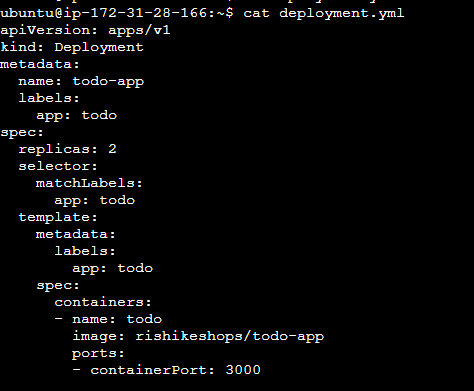
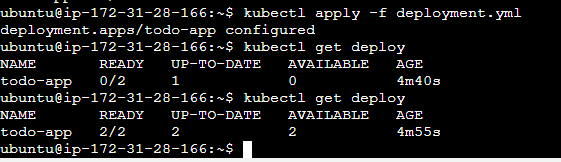
Let's apply the deployment to your k8s (minikube) cluster using the command kubectl apply -f deployment.yml. We can see that a deploy is created and 1 replica set is created.
We can check the deploy - kubectl get deploy
We can check the replica set - kubectl get rs

Check the pods - kubectl get pod. We can see that 2 pods have been created.

Let's keep a watch on the pods and see how K8s implements auto-healing.

Let's delete a pod out of the 2 pods.

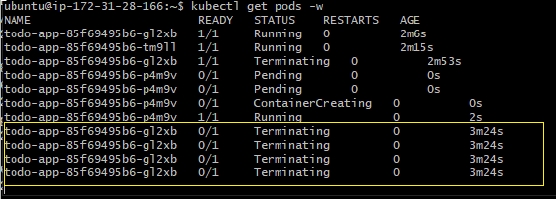
Here, we can see that the pod that we deleted above is being terminated here and a new pod is being created.
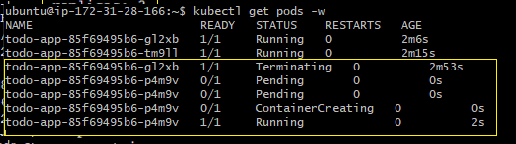
Here, we can see that the new pod is created here.

Here, the pod is finally terminated.
Now, let's increase the number of replicas to 3 and see how K8s manages.
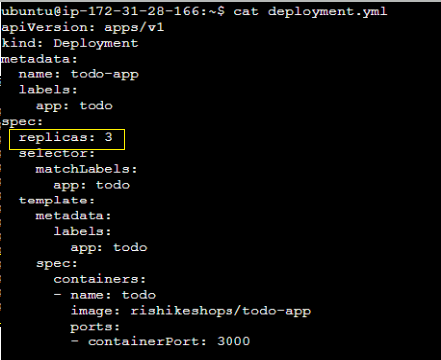
Let's apply the updated YAML file.

Here, we can see that a new pod is being created and is running successfully.
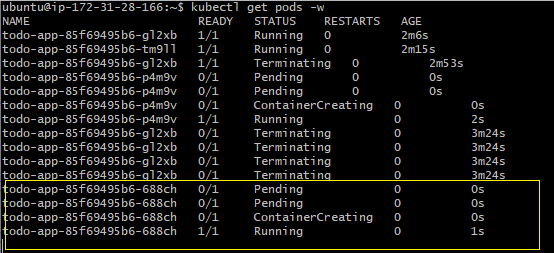
We can see that a new pod is running.
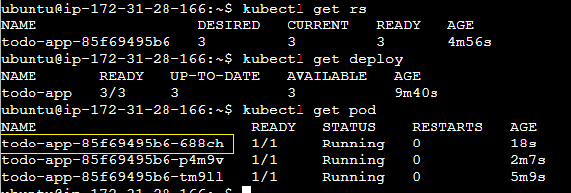
We have successfully created a deployment using Kubernetes and how it auto heals.